tl;dr This article uses the analogy of a professional photographer’s studio to explain Azure’s backup and recovery services - Azure Backup, MARS Agent, MABS, DPM, and Azure Site Recovery. It highlights the key differences between each service and when to choose one over another.
I created this article, but it has been reviewed and refined with help from AI tools: Claude and Grammarly.
Introduction
As I prepare for the AZ-104 and AZ-305 exams, I’ve found the many Azure backup and recovery solutions confusing. The names often blur together, and remembering which service backs up what can be challenging. To simplify this, I’ve come up with an analogy based on something I know well - running a photography studio.
The Analogy: A Professional Photographer’s Studio
Imagine you’re a professional photographer running a studio. You’ve got editing workstations, client files, archives of past shoots, and the studio itself - all of which need protecting. Azure’s backup and recovery services map neatly onto the different ways you might protect your work.
Primary Backup Services
Azure Backup: Your Automatic Cloud Photo Sync
Think of Azure Backup like enabling iCloud Photos or Google Photos on all your devices. You switch it on, and your photos are automatically backed up to the cloud - the Recovery Services Vault. You don’t manage any infrastructure or worry about the details. It just works. In Azure terms, it’s the managed, cloud-native backup service for Azure VMs, file shares, databases, and on-premises servers. Set it and forget it.
Microsoft Azure Recovery Services (MARS) Agent: A Backup App Installed on One Laptop
The MARS Agent is like installing a small backup utility on one specific workstation in your studio. You tell it exactly which folders to back up - say, your /Edits and /Client-Contracts folders - and it pushes just those files to your cloud storage (the Recovery Services Vault). It handles whole volumes and Windows system state too, not just files and folders. It’s lightweight, runs on a single machine, and doesn’t need any server infrastructure. Use this when you need granular backup from one specific machine, whether that’s on-premises or an Azure VM. One catch worth knowing: MARS is Windows only. There’s no Linux agent.
Microsoft Azure Backup Server (MABS): A Dedicated NAS Box in Your Studio
MABS is like setting up a dedicated NAS (network-attached storage) in your studio. Multiple workstations back up to this central box, which keeps local copies for fast restores. The NAS also syncs everything to the cloud (Recovery Services Vault) as a safety net. You manage the NAS yourself, but you don’t need an enterprise licence. MABS extends Azure Backup to handle on-premises workloads like VMs and application servers, giving you both local speed and cloud durability.
System Center Data Protection Manager (DPM): Enterprise Archive for a Large Photography Agency
DPM is what you’d use if your studio grew into a large photography agency with dozens of staff and compliance requirements. It’s MABS’s enterprise sibling - it stores to disk for quick access, archives to tape for long-term retention and regulatory compliance, and syncs to the cloud (Recovery Services Vault). It’s part of the System Center management suite, making it the right choice for large organisations with complex backup needs or an existing System Center investment.
Azure Site Recovery (ASR): A Second Fully-Equipped Studio in Another City
ASR is not a backup service. It’s a disaster recovery service. Imagine you have a second, fully-equipped studio in another city. Every time you take a photo, edit a file, or update your workflow in your main studio, the change is continuously replicated to the second studio. If your main studio burns down, you walk into the second one and resume shooting within minutes - your equipment setup, files, and workflow are all there, ready to go. In Azure terms, ASR continuously replicates entire workloads to a secondary site or another Azure region. It’s about business continuity with near-zero downtime, not restoring from a backup hours later.
Supporting Services
Recovery Services Vault: Your Secure Cloud Storage Locker
The Recovery Services Vault is the secure cloud storage locker that sits behind most of these services. It’s where Azure Backup stores recovery points for Azure VMs, Azure Files, and SQL or SAP HANA running in a VM, and it’s where MARS Agent, MABS, and DPM send their data. ASR uses it too, but only for replication configuration and metadata - your replicated data doesn’t live in the vault. Think of it as the safe deposit box that keeps your most valuable work protected.
Backup Vault: The Second Locker, for Newer Gear
Azure Backup has a second vault type, and this trips people up. Backup Vaults hold the newer data sources: Azure Disks, Azure Blobs, Azure Database for PostgreSQL, and Kubernetes services. Same idea, different locker. You pick the vault type based on what you’re protecting, so it’s worth knowing both exist before you go hunting for a PostgreSQL backup inside a Recovery Services Vault and wonder why it isn’t there.
Resiliency, formerly Backup Center: Your Studio Management Dashboard
This is the single dashboard where you see the status of all your backups - local, tape, or cloud - and where you manage them. Be aware the name has moved twice since I first wrote this. Backup Center became Azure Business Continuity Center, which is now simply Resiliency in the portal. Search for “Resiliency”, because “Backup Center” no longer turns up in portal search. It covers both Azure Backup and Azure Site Recovery.
Backup Reports: Your Backup Health Check
Backup Reports show how your backups are performing across all storage locations. They flag issues and help you optimise your backup strategy - useful for auditing and compliance.
Which Service Should I Use?
This is the question the analogy is meant to answer:
- Azure Backup - You want simple, managed backup of Azure resources (VMs, SQL databases, file shares). The default starting point.
- MARS Agent - You need to back up files, folders, volumes, or system state from one particular Windows machine. Lightweight, no server required, Windows only.
- MABS - You have on-premises workloads and want both local copies (fast restores) and cloud copies (durability). No System Center licence needed.
- DPM - You’re a large organisation with complex needs: tape archival, regulatory compliance, or an existing System Center investment.
- ASR - You need disaster recovery with near-zero downtime. Your business can’t afford hours of restore time - you need to failover in minutes.
The key mental model: Azure Backup, MARS, MABS, and DPM are all about backup and restore (getting your data back after something goes wrong). ASR is about continuity (keeping your business running during a major outage by switching to a replica).
Summary Tables
Primary Backup Services
| Service | Analogy | What It Backs Up | Storage | When to Use |
|---|---|---|---|---|
| Azure Backup | Cloud photo sync (iCloud/Google Photos) | Azure VMs, file shares, databases, disks, blobs, on-premises | Recovery Services Vault, or Backup Vault for newer workloads | Managed cloud backup of Azure resources |
| MARS Agent | Backup app on one laptop | Files, folders, volumes, Windows system state | Recovery Services Vault | Granular backup from one specific Windows machine |
| MABS | Dedicated NAS in the studio | On-premises workloads, VMs, app servers | Local disk + Recovery Services Vault | On-premises backup with local and cloud copies |
| DPM | Enterprise archive for a large agency | Enterprise applications and workloads | Disk + tape + Recovery Services Vault | Large orgs with tape, compliance, or System Center |
| ASR | Second studio in another city | Entire workloads (continuous replication) | Secondary site + Recovery Services Vault (metadata) | Disaster recovery with minutes-not-hours failover |
Supporting Services
| Service | Analogy | Role |
|---|---|---|
| Recovery Services Vault | Secure cloud storage locker | Stores backup data and recovery points for VMs, Azure Files, SQL/SAP HANA in VMs, MARS, MABS, and DPM |
| Backup Vault | The second locker, for newer gear | Stores backups for Azure Disks, Azure Blobs, PostgreSQL, and Kubernetes services |
| Resiliency (formerly Backup Center) | Studio management dashboard | Monitors and manages backups across all storage |
| Backup Reports | Backup health check | Provides insights on backup performance |
How They Fit Together
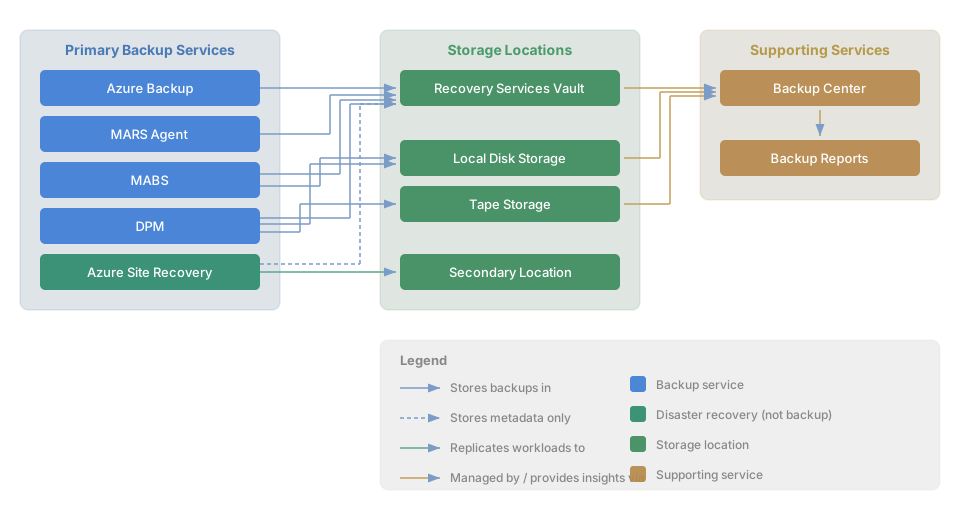
This diagram shows the relationships between the primary backup services, their storage locations, and the supporting services:
Conclusion
By mapping Azure’s backup and recovery services to the familiar concept of running a photography studio, the distinctions become much clearer. The most important takeaway is the line between backup (getting data back) and disaster recovery (keeping the business running) - that’s the Azure Backup vs ASR distinction that trips most people up.
Thanks for reading.